motus
Made by clinicians, for clinicians

Your criteria, your exercise, your patient.

Every other exercise platform is a stock video library. Motus isn't. You demonstrate the movement, the patient performs it, you capture the clip on your phone — that becomes the programme. No searching, no substitutes.

✓No video library to browse✓No patient login✓Captured in session

Sarah Martinez

3 exercises shared · Post-op knee (ACL wk 4)

Capture

Hip flexion

Sets3
Reps10
×/d3
×/wk7
Today
2/32
Apr 18
3/32

Back chain

Sets2
Reps12
×/d2
×/wk7
Today
2/23
Apr 18
2/23

Shoulder abduction

Sets3
Reps10
×/d2
×/wk7
Today
1/24
Apr 18
2/24
Simplicity

The content comes from the session.

It doesn't matter how complex the exercise is. You demonstrate. The patient repeats. You capture the clip. No library to browse. No stranger doing a generic exercise. It follows the natural flow of the visit.

You capture

You point the phone. Three seconds. Done.

You show the exercise to the patient, who repeats it while you capture. The clip goes straight to the patient's phone — no downloads to bother with, no logins, no feedback email request, no ads.

0:00
.51×2
Share

One scan, no login.

Sarah Martinez
Physiotherapy Program
motus.avlis.group/patient/8kQ2vTnLr4
Scan to open

QR code or link — straight from the dashboard.

Reflect

The patient opens the link and sees the work.

Scan the code or tap the link, and there it is — the patient, doing the exercise correctly. No login. No download. Just that.

9:41
SM

Hello, Sarah!

3 exercises assigned

Hip flexion

Sets3
Reps10
Times per day3×
Times per week7×
Squeeze for 5 seconds, keep the heel down.
Done (2 / 3)

Back chain

Sets2
Reps12
Times per day2×
Times per week7×
Completed ✓

Shoulder abduction

Sets3
Reps10
Times per day2×
Times per week7×
Done (1 / 2)
Multi-angle capture

Capture any movement from every angle.

Film the same exercise from several angles at once. Seen side by side, compensations and asymmetries that hide in a single view become obvious — and the more complex the movement, the more one angle leaves out.

Drawing on the clip

Draw on the movement to explain it.

Mark what you want the patient to watch — straight onto the patient's own clip. Explain the process, make it clear, make it simple.

Desk and phone, one session

Start at the desk. Capture with the phone. It is already there.

The desk app and the phone are the same session. Open the patient on the computer, pick up your phone to film, and the capture lands in the open programme before you put the phone down.
On the deskThe programme stays open in front of you.Build the session where you already work — full screen, keyboard, the whole patient history beside it.
In your handFilm where the patient is standing.The phone is the camera, nothing more. Stop recording and the clip appears on the desk, in the right exercise.
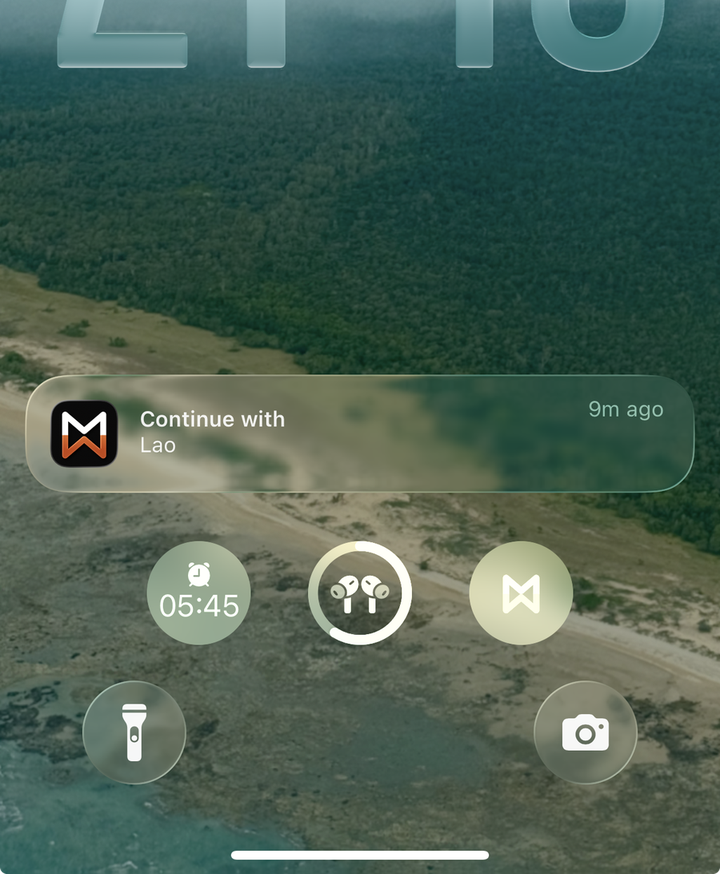
Phone lock screen showing a Motus notification to continue with the open patient, and a Motus shortcut in the control ring.
Continuity mode

Pick up where you left off, in one tap.

While a session is open, the patient waits on your lock screen. Tap the notification and you are inside the patient's programme — no sign-in, no searching the patient list, no wondering whether you opened the right record.

  • The current patient surfaces on the idle phone
  • One tap straight into the patient's programme
  • Nothing to sign in to, nothing to search
Three use cases

One tool. Many ways to use it.

The same capture-and-share solves different clinical problems without adding three different tools to your workflow.

Patient programme

Personalised plans, captured in session.

Build a plan from clips of the patient performing each exercise. The patient opens it instantly via QR or link — no login, no email registration. You monitor adherence from the portal, and paste the link straight into the clinic's notes system.

  • QR or link — no app install
  • Adherence visible per patient
  • Drops into existing clinical notes

Hip flexion

Sets3
Reps10
Times per day3×
Times per week7×
Squeeze for 5 seconds, keep the heel down.
Done (2 / 3)

Back chain

Sets2
Reps12
Times per day2×
Times per week7×
Completed ✓
Outcome measures

Progress made visible. Objectively.

Flag any exercise as an outcome. The first capture is stored. Weeks later, capture again — Motus pairs them side by side. Range, control, compensation: visible at a glance. Defensible in the notes. Powerful in the conversation with the patient.

  • Side-by-side video comparison
  • Baseline locked at first capture
  • Re-capture as many times as needed
Exercise stations

Print one QR. The station explains itself.

Capture every exercise variation for a station — rack pulls, deadlifts, kettlebell work — and print the QR. Athletes and patients scan it and see the correct execution or routine, every cue, every angle. No default exercise. The video is the instruction sheet.

  • One QR, multiple variations of the same exercise
  • Update remotely
  • Built for gyms, rehab gyms, clinic gym corners
Squat rack · station 4
5 variations
scan with camera
aBack squat3×8
bBox squat3×6
cTempo squat3×5
dPause squat3×5
eGoblet squat3×10

Same primitive — capture, share by QR, view without an account — applied to three different problems. Nothing extra to learn.

Patient feedback

You decide what to ask for.

Per exercise, choose what comes back with each completion — perceived exertion, pain level, or simply an open channel for the patient to write a note. Ask for what you'll actually act on, and nothing more.

How hard was it?

Rate how much effort this exercise took

Very easyMaximal
012345678910
5/10
CancelSend

Perceived exertion

A 0–10 RPE on the exercise the patient just finished. Load progression grounded in what the patient felt, not what you assumed.

How was the pain?

Rate your pain level during this exercise

No painWorst pain
012345678910
5/10
CancelDone

Pain level

Captured per completion, so a flare shows up as a trend in the record instead of a half-remembered comment at the next visit.

Messages

Close

Send a note to your clinician.

Write a message…

Just a channel

No scale at all — only a place to write. For patients where a number adds nothing and a sentence says everything.

Outcome measures

Range of motion, measured from the clip itself.

Select the joint, then the first and last position of the segment: done. You have the goniometry. Repeat the measure later and Motus calculates the variation over time. Ready to export to your EHR software.
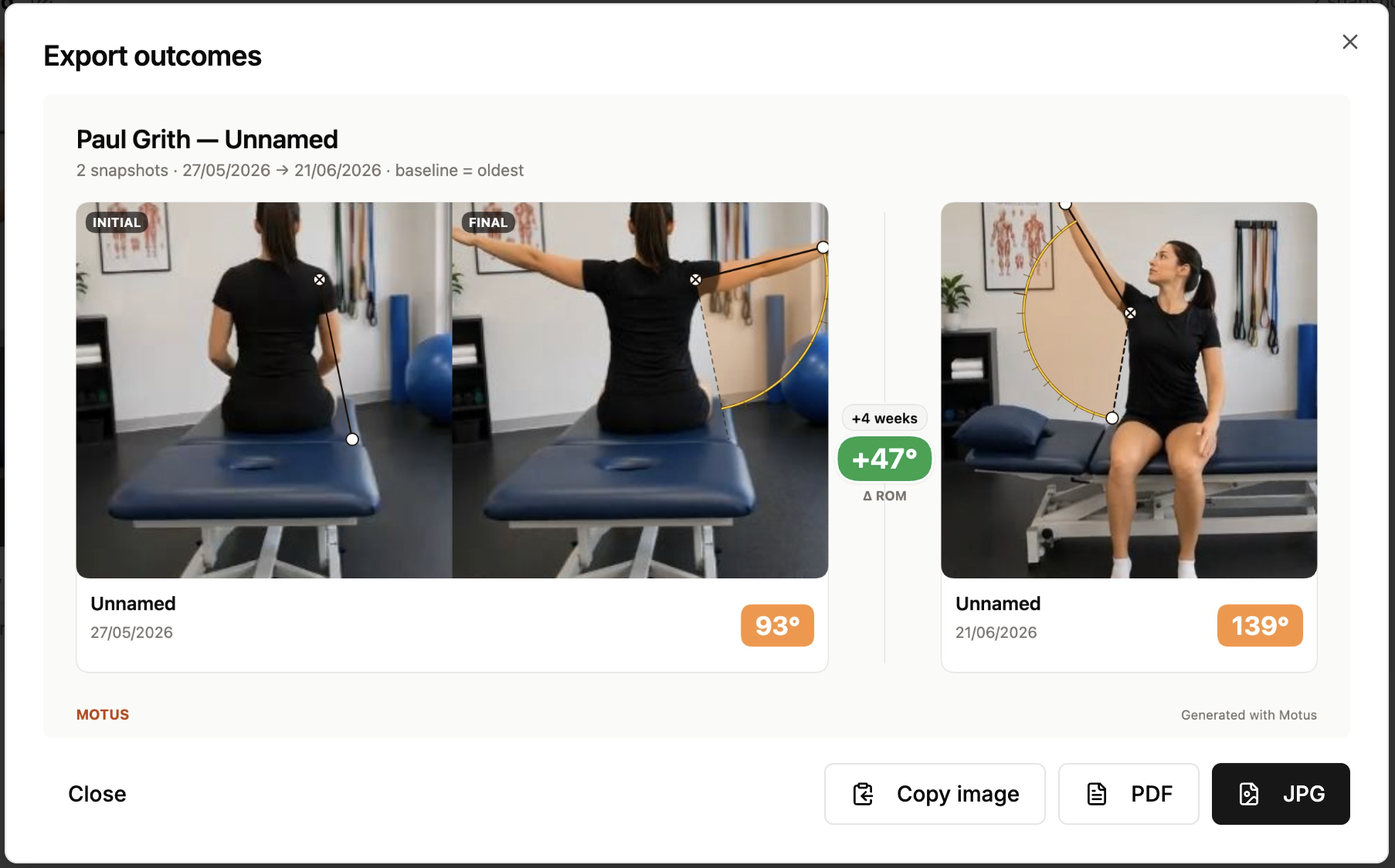
Recorded in the appBaseline and re-measure, compared and exported.Motus pairs the two captures, calculates the difference in range of motion, and hands over one image that goes straight into the record.
Motus Export outcomes dialog: two captures compared side by side with goniometry overlays, peak angles and change in range of motion, plus Copy image, PDF and JPG export actions.
Into the notes

It fits the record system you already use.

No integration to commission, no IT ticket, no FHIR project. Export any exercise card or outcome comparison as an image or PDF — or copy it to the clipboard and paste it straight into the patient's notes.

  • Copy the image, paste it into any EMR field
  • One tap for a JPG or a print-ready PDF
  • Patient name, joint and dose travel with it
Recorded in the appA whole programme into the record, as one paste.Select the exercises, export the card, paste it into the notes. Ready to file, or to hand over on paper.
Recorded in the appSeveral frames of the same exercise.Pick the moments that explain the movement and export them together, so the still images carry what the video showed.

The first tool that fits the way a clinic already works. Patients do the exercises by watching themselves doing them.

Plans

Choose the plan that fits your practice.

Start with one clinician and one patient. Add seats when the clinic grows.

Solo
For independent practitioners
A$29/mo
A$24/mo billed annually
  • 1 seat
  • Unlimited patients
  • Up to 3 station QR codes
Start free trial
Max
For large practices and networks
Custom
Annual billing, by agreement
  • Unlimited seats
  • Unlimited patients
  • Unlimited station QR codes
  • Patients shared across the clinic
  • Clinic analytics
  • Branded patient portal
Talk to us

15-day free trial on every plan · Compare plans in detail

The patient is the content.

Capture-in-session, no-login exercise prescription. Fits the clinic workflow you already have.